2023年8月24日木曜日

Change the texture group of the selected textures.

 import unreal


# エディタ内で選択されたアセットを取得

selected_assets = unreal.EditorUtilityLibrary.get_selected_assets()


for asset in selected_assets:

    if isinstance(asset, unreal.Texture2D):

        # Texture GroupをCharacterに設定

        asset.set_editor_property('LODGroup', unreal.TextureGroup.TEXTUREGROUP_CHARACTER)

        # アセットの変更を保存

        unreal.EditorAssetLibrary.save_loaded_asset(asset)


 #他の値に変更する場合はTEXTUREGROUP_CHARACTERの代わりに以下のEnumを使用する

 #https://docs.unrealengine.com/4.26/en-US/PythonAPI/class/TextureGroup.html

2023年7月24日月曜日

異なるアーマチュアからボーンの名前をコピーする

import bpy

import math


def find_nearest_bone(target_bone, reference_armature):

    min_distance = float('inf')

    nearest_bone_name = None


    for bone in reference_armature.data.bones:

        distance = (bone.head - target_bone.head).length

        if distance < min_distance:

            min_distance = distance

            nearest_bone_name = bone.name


    return nearest_bone_name


# ArmatureAとArmatureBを取得

armature_a = bpy.data.objects.get("ArmatureA")

armature_b = bpy.data.objects.get("ArmatureB")


# ArmatureAがアーマチュアであることを確認

if armature_a and armature_a.type == 'ARMATURE':

    # ArmatureBがアーマチュアであることを確認

    if armature_b and armature_b.type == 'ARMATURE':


        # ArmatureAのボーンに対して処理を行う

        for bone_a in armature_a.data.bones:

            # ArmatureBの中で一番近いボーンを見つける

            nearest_bone_name = find_nearest_bone(bone_a, armature_b)


            # ボーンの名前を変更

            bone_a.name = nearest_bone_name


    else:

        print("ArmatureB is not an armature.")

else:

    print("ArmatureA is not an armature.")

2023年4月12日水曜日

Copies keyframes of specific frame number of selected bones in pose mode to specified frame numbers.

 import bpy


# キーフレームの番号リスト

keyframe_numbers = [1, 2]  # このリストにコピー先のキーフレーム番号を追加してください。


# アクティブなオブジェクトがアーマチュアであることを確認

if bpy.context.object.type == 'ARMATURE':

    armature = bpy.context.object

    action = armature.animation_data.action


    # 選択中のボーンに対して処理を行う

    for bone in armature.pose.bones:

        if bone.bone.select:

            bone_path = f'pose.bones["{bone.name}"].'


            # キーフレーム10の各F-Curveを探索

            for fcurve in action.fcurves:

                if fcurve.data_path.startswith(bone_path):

                    keyframe_10 = None


                    # キーフレーム10の値を取得

                    for keyframe in fcurve.keyframe_points:

                        if keyframe.co[0] == 10:

                            keyframe_10 = keyframe

                            break


                    # キーフレーム10が見つかった場合

                    if keyframe_10 is not None:

                        # 与えられた番号のリストのキーフレームにコピー

                        for kf_number in keyframe_numbers:

                            fcurve.keyframe_points.insert(kf_number, keyframe_10.co[1])


else:

    print("Error: Active object is not an armature.")


2023年2月13日月曜日

How to resize my blender market assets.

import bpy, mathutils


armature_object = bpy.data.objects["VultureArmature"]

multiplier=3

# Set the scale to multiplier

armature_object.scale *= multiplier


# set mode to object

bpy.ops.object.mode_set(mode='OBJECT')


# select the armature

armature_object.select_set(True)


# set the active object to the armature

bpy.context.view_layer.objects.active = armature_object


# apply the scale transformation

bpy.ops.object.transform_apply(scale=True)


Emptyaction1 = bpy.data.actions["VultureIKEmpty_L_Action"]


for fcu in Emptyaction1.fcurves:

    if "location" in fcu.data_path:

        for keyframe in fcu.keyframe_points:        

            keyframe.co = (keyframe.co - mathutils.Vector((keyframe.co.x,0))) * multiplier + mathutils.Vector((keyframe.co.x,0)) 

            keyframe.interpolation='LINEAR'                

Emptyaction2 = bpy.data.actions["VultureIKEmpty_R_Action"]


for fcu in Emptyaction2.fcurves:

    if "location" in fcu.data_path:

        for keyframe in fcu.keyframe_points:        

            keyframe.co = (keyframe.co - mathutils.Vector((keyframe.co.x,0))) * multiplier + mathutils.Vector((keyframe.co.x,0))               

            keyframe.interpolation='LINEAR'             

action = bpy.data.actions["VultureArmatureAction"]


for fcu in action.fcurves:

    if "location" in fcu.data_path:

        for keyframe in fcu.keyframe_points:        

            keyframe.co = (keyframe.co - mathutils.Vector((keyframe.co.x,0))) * multiplier + mathutils.Vector((keyframe.co.x,0))      

            keyframe.interpolation='LINEAR'       

2023年2月2日木曜日

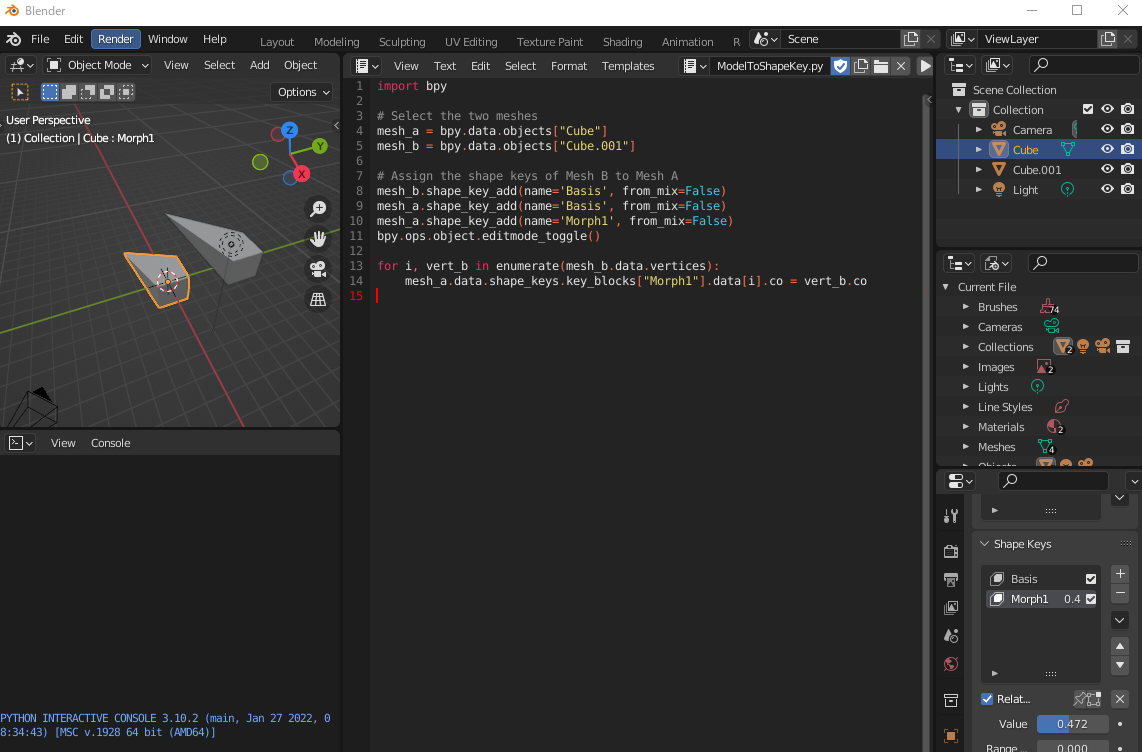
異なるメッシュをShapeKeyのデータにする


import bpy


# Select the two meshes

mesh_a = bpy.data.objects["Cube"]

mesh_b = bpy.data.objects["Cube.001"]


# Assign the shape keys of Mesh B to Mesh A

mesh_b.shape_key_add(name='Basis', from_mix=False)

mesh_a.shape_key_add(name='Basis', from_mix=False)

mesh_a.shape_key_add(name='Morph1', from_mix=False)

bpy.ops.object.editmode_toggle()


for i, vert_b in enumerate(mesh_b.data.vertices):

    mesh_a.data.shape_keys.key_blocks["Morph1"].data[i].co = vert_b.co